
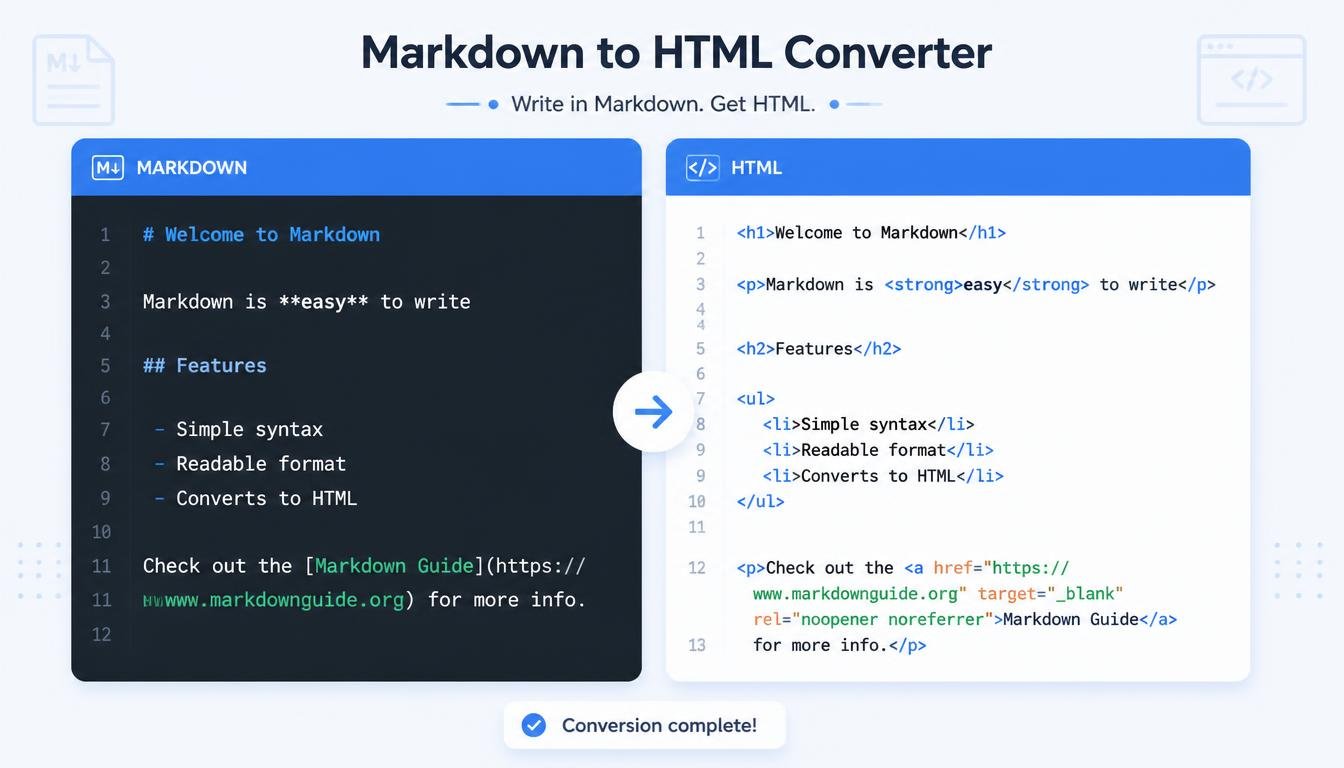
# Markdown to HTML Converter: Turn Simple Markdown into Clean HTML
Writing content for the web can sometimes feel more complicated than it needs to be.
You may have a beautifully formatted document written in Markdown, but when you need to publish it on a website, you may suddenly need HTML.
Headings, paragraphs, links, lists, bold text, italic text, code blocks, and other formatting elements all need to be represented correctly in HTML.
If you don't know HTML well, converting everything manually can take time and can easily lead to mistakes.
That's where a Markdown to HTML Converter becomes useful.
A Markdown to HTML Converter takes Markdown-formatted text and converts it into HTML code. Instead of manually writing tags such as <h1>, <p>, <strong>, <a>, and <ul>, you can let the converter handle the basic transformation for you.
For bloggers, developers, writers, students, content creators, documentation teams, and website owners, this can make content preparation much faster.
## What Is Markdown?
Markdown is a lightweight markup language designed to make formatted text easy to write and read.
Instead of using complicated HTML tags, Markdown uses simple characters and conventions.
For example, a Markdown heading can look like:
# My First Blog Post
Bold text can be written as:
**This is bold text**
Italic text can be written as:
*This is italic text*
A link can look like:
[Visit Example](https://example.com)
A bullet list can be written as:
- First item
- Second item
- Third item
The simplicity of Markdown is one of the reasons it is popular among developers, writers, technical teams, and content creators.
## What Is HTML?
HTML stands for HyperText Markup Language.
It is the standard markup language used to structure content on webpages.
HTML uses elements to tell browsers how content should be structured.
For example:
<h1>My First Blog Post</h1>
A paragraph can be represented as:
<p>This is a paragraph.</p>
A link can be written as:
<a href="https://example.com">Visit Example</a>
An unordered list can look like:
<ul>
<li>First item</li>
<li>Second item</li>
<li>Third item</li>
</ul>
While HTML is extremely useful, writing it manually for every piece of content can be repetitive.
Markdown provides a simpler writing experience, while HTML provides the structure browsers understand.
## What Is a Markdown to HTML Converter?
A Markdown to HTML Converter is a tool that transforms Markdown syntax into HTML markup.
For example, you enter:
# Welcome to My Website
This is a **simple paragraph**.
The converter can produce HTML similar to:
<h1>Welcome to My Website</h1>
<p>This is a <strong>simple paragraph</strong>.</p>
Instead of writing the HTML manually, the tool handles the conversion.
This can save time and reduce basic formatting errors.
## Why Convert Markdown to HTML?
Markdown is excellent for writing, but websites often require HTML.
You may write an article in Markdown because it's fast and comfortable.
Later, you may need to:
- Publish it on a website
- Add it to a CMS
- Insert it into an HTML page
- Create documentation
- Build a web application
- Prepare an email template
- Convert notes into webpage content
A Markdown to HTML Converter bridges the gap between simple writing and web-ready markup.
## How Does Markdown to HTML Conversion Work?
A converter reads the Markdown syntax and identifies the formatting instructions.
For example:
# Heading
is recognized as a heading.
It may be converted to:
<h1>Heading</h1>
Similarly:
**Bold text**
can become:
<strong>Bold text</strong>
And:
- Item One
- Item Two
can become:
<ul>
<li>Item One</li>
<li>Item Two</li>
</ul>
The converter follows Markdown parsing rules and produces the corresponding HTML structure.
More advanced converters may support additional Markdown features and extensions.
## Converting Markdown Headings
Headings are one of the most common Markdown elements.
For example:
# Main Heading
## Section Heading
### Subheading
These can be converted into HTML headings:
<h1>Main Heading</h1>
<h2>Section Heading</h2>
<h3>Subheading</h3>
Headings are useful for organizing long articles and making content easier to scan.
A well-structured heading hierarchy can also help users understand how different sections relate to one another.
## Converting Bold and Italic Text
Markdown makes emphasis simple.
Bold:
**Important information**
Italic:
*Important information*
The corresponding HTML might be:
<strong>Important information</strong>
and:
<em>Important information</em>
This makes it easy to create formatted content without constantly typing HTML tags.
## Converting Links
Markdown provides a simple way to create hyperlinks.
For example:
[Open our website](https://example.com)
A converter can transform this into:
<a href="https://example.com">Open our website</a>
This is particularly useful for bloggers and documentation writers who frequently include links.
Always review generated links before publishing, especially when working with external websites.
## Converting Images
Markdown can also represent images.
For example:

A converter may produce HTML similar to:
<img src="image.jpg" alt="Beautiful landscape">
The exact HTML depends on the converter and its configuration.
It's important to provide meaningful alternative text for images where appropriate because alt text can improve accessibility and help explain images when they cannot be displayed.
## Converting Bullet Lists
Markdown makes unordered lists easy.
For example:
- Apple
- Orange
- Banana
The HTML output may look like:
<ul>
<li>Apple</li>
<li>Orange</li>
<li>Banana</li>
</ul>
Lists are useful for presenting information in a way that's easy to scan.
They are commonly used in:
- Blog posts
- Tutorials
- Documentation
- Product descriptions
- Guides
- FAQs
## Converting Numbered Lists
Markdown also supports ordered lists.
For example:
1. Open the website.
2. Enter your text.
3. Click the convert button.
The corresponding HTML can be:
<ol>
<li>Open the website.</li>
<li>Enter your text.</li>
<li>Click the convert button.</li>
</ol>
This is useful when the order of instructions matters.
## Converting Blockquotes
Markdown blockquotes usually begin with a greater-than symbol.
For example:
> Writing is a skill that improves with practice.
This can become:
<blockquote>Writing is a skill that improves with practice.</blockquote>
Blockquotes can be useful for highlighting quotations, notes, or important statements.
## Converting Code
Markdown is particularly popular among developers because it can represent code clearly.
Inline code can be written using backticks:
`console.log("Hello");`
A code block can be represented with triple backticks.
For example:
```text
function hello() {
console.log("Hello");
}