# Text Diff / Compare Tool: Compare Two Texts and Find Every Difference
Have you ever edited a document and wondered what actually changed?
Maybe you updated a blog post, revised a contract, corrected an essay, or modified source code. The new version looks almost identical to the old one, but finding the exact differences manually can be frustrating.
This is where a **Text Diff / Compare Tool** becomes incredibly useful.
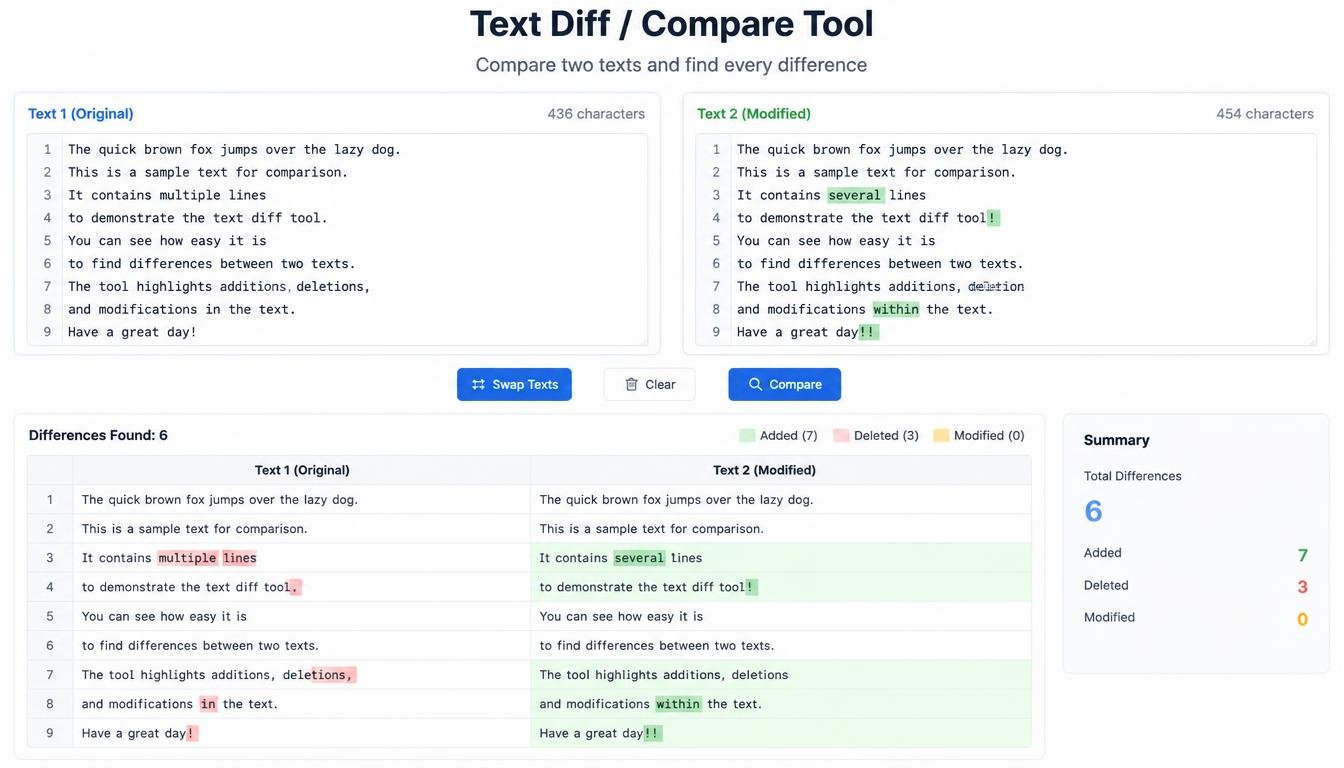
A Text Diff Tool compares two pieces of text and highlights every addition, deletion, and modification. Instead of reading hundreds of lines side by side, you instantly see what has changed.
Whether you're a writer, student, developer, editor, teacher, lawyer, or business professional, comparing text accurately can save time and reduce mistakes.
---
## What Is a Text Diff / Compare Tool?
A Text Diff (Difference) Tool is an online utility that compares two versions of text and identifies the differences between them.
You simply paste:
- **Original Text**
- **Modified Text**
The tool analyzes both versions and highlights changes.
For example:
**Original**
The quick brown fox jumps over the dog.
**Modified**
The quick brown fox jumps over the lazy dog.
The tool identifies that the word **lazy** was added.
Instead of reading both paragraphs repeatedly, you immediately know what changed.
---
## Why Is Comparing Text Important?
Small edits can easily be overlooked.
Imagine reviewing a 5,000-word article where only three words were changed. Finding those edits manually could take several minutes—or much longer.
A comparison tool helps you:
- Detect edits instantly
- Review revisions
- Verify corrections
- Compare drafts
- Check copied content
- Validate updates
- Save editing time
It provides clarity without requiring manual line-by-line reading.
---
## How Does a Text Diff Tool Work?
A comparison tool analyzes two texts and matches similar sections.
It generally identifies three types of changes:
### Added Text
Words or lines that appear only in the new version.
### Removed Text
Content that existed in the original but no longer appears.
### Modified Text
Words or phrases that have been changed rather than completely removed.
The result is a visual comparison that makes revisions easy to understand.
---
## Compare Two Articles
Bloggers often update existing articles.
For example, an article written last year may receive new statistics, better headings, improved wording, or updated examples.
Instead of asking:
*"What did I change?"*
You can compare both versions.
This is especially useful before publishing updates because it helps verify that only the intended edits were made.
---
## Text Compare Tool for Writers
Writers frequently create multiple drafts.
Draft 1 may focus on ideas.
Draft 2 improves grammar.
Draft 3 refines style.
After several revisions, remembering every edit becomes difficult.
A Text Diff Tool lets writers compare drafts and review improvements objectively.
It can also help freelance writers show clients exactly what was revised during editing.
---
## Compare Essays for Students
Students often revise assignments before submission.
A comparison tool can help verify that:
- Grammar corrections were applied
- Required edits were completed
- Feedback was addressed
- Final revisions were included
Instead of relying on memory, students can compare the original and revised essays directly.
This makes proofreading much more efficient.
---
## Compare Research Documents
Researchers regularly update reports, papers, and manuscripts.
Even small wording changes can affect meaning.
A comparison tool helps identify:
- Edited terminology
- Updated references
- Revised conclusions
- Corrected data labels
- Changed methodology descriptions
For academic work, reviewing revisions carefully is extremely important.
---
## Compare Contracts and Agreements
Business documents often go through multiple revisions.
Examples include:
- Contracts
- Proposals
- Agreements
- Policies
- Terms and Conditions
- Privacy Policies
A Text Diff Tool allows reviewers to identify exactly what changed between versions.
This improves transparency during document review.
However, legal documents should always be reviewed by qualified professionals before being finalized.
---
## Compare Website Content
Website owners frequently update pages such as:
- Home page
- About page
- FAQ
- Privacy Policy
- Blog articles
- Landing pages
Instead of guessing what changed after editing, a comparison tool provides a clear before-and-after view.
This is particularly useful when several team members contribute to the same website.
---
## Compare Source Code
Developers compare code constantly.
A Text Diff Tool can help identify changes in:
- HTML
- CSS
- JavaScript
- Python
- PHP
- JSON
- Configuration files
- Documentation
For example:
Original:
background: blue;
Modified:
background: green;
The tool immediately highlights the changed value.
Professional development platforms include advanced diff systems, but a simple online comparison tool is useful for quick text comparisons.
---
## Compare Markdown Files
Documentation writers often maintain Markdown files.
Examples include:
- README
- CHANGELOG
- Documentation
- Tutorials
A comparison tool helps verify changes before publishing updated documentation.
This reduces the risk of accidentally removing important information.
---
## Compare Product Descriptions
E-commerce businesses regularly improve product descriptions.
A revised description may include:
- Better wording
- Updated features
- Corrected specifications
- Improved formatting
Comparing the old and new versions ensures that important product information wasn't accidentally removed.
---
## Compare SEO Content
SEO professionals frequently update articles.
Changes may include:
- New headings
- Better keywords
- Internal links
- Improved readability
- Updated examples
A Text Compare Tool helps verify content updates before republishing.
It's useful for quality control rather than ranking manipulation.
---
## Line-by-Line Comparison
Many comparison tools analyze text line by line.
For example:
Original:
Apple
Orange
Banana
Modified:
Apple
Grapes
Banana
The tool clearly shows that **Orange** became **Grapes**.
This is especially useful for lists, datasets, and structured documents.
---
## Word-by-Word Comparison
Some comparison tools go even further by highlighting individual word changes.
Example:
Original:
Artificial intelligence improves productivity.
Modified:
Artificial intelligence significantly improves productivity.
Only the word **significantly** is highlighted as an addition.
This provides a more detailed review experience.
---
## Character-Level Differences
Advanced comparison tools may identify changes at the character level.
For example:
Color
Colour
Only the additional **u** is identified.
This can be helpful when reviewing spelling differences between English variants or correcting typographical errors.
---
## Why Manual Comparison Is Difficult
Human eyes naturally skip repeated information.
If two paragraphs are nearly identical, it's easy to overlook a missing word.
Consider these sentences:
The meeting starts at 9:00 AM.
The meeting starts at 9:30 AM.
The difference is small but important.
A comparison tool reduces the chance of missing these subtle edits.
---
## Text Compare for Teachers
Teachers often compare:
- Student drafts
- Corrected assignments
- Model answers
- Edited essays
- Writing exercises
A comparison tool helps demonstrate revisions during classroom instruction.
Students can also learn how editing improves writing quality.
---
## Compare Notes
Students and professionals frequently maintain multiple versions of notes.
Instead of merging them manually, comparing versions can reveal:
- Added information
- Deleted ideas
- Updated dates
- Corrected terminology
This helps keep notes organized and accurate.
---
## Compare CSV and Lists
Although dedicated spreadsheet software is often better for structured data, a text comparison tool can still help compare copied lists.
Examples include:
- Email lists
- Keywords
- Product names
- URLs
- Categories
- IDs
Line-by-line comparison can quickly reveal missing or added entries.
---
## Compare Before Publishing
One of the best times to use a comparison tool is immediately before publishing.
Review:
- Blog updates
- Website pages
- Documentation
- Marketing copy
- Product pages
This final check helps ensure that only intended changes were introduced.
It's a simple quality assurance step that can prevent embarrassing mistakes.
---
## How to Use a Text Diff / Compare Tool
Using the tool is usually straightforward.
### Step 1: Paste the Original Text
Place the older version into the first input box.
### Step 2: Paste the New Text
Place the revised version into the second box.
### Step 3: Click Compare
The tool analyzes both texts.
### Step 4: Review the Differences
Look for highlighted additions, deletions, and modifications.
### Step 5: Copy or Save
Use the comparison results to finalize your edits.
The entire process usually takes only a few seconds.
---
## Common Uses of a Text Compare Tool
This tool is useful for many everyday tasks.
### Writers
Compare article drafts.
### Students
Review revised essays.
### Developers
Check code changes.
### Bloggers
Verify updated content.
### Businesses
Compare contracts and proposals.
### Teachers
Review student revisions.
### Researchers
Track manuscript edits.
### Editors
Proofread modified documents.
---
## Benefits of Using a Text Diff Tool
### Save Time
No need to read two documents repeatedly.
### Improve Accuracy
Find even small changes quickly.
### Better Proofreading
Review edits with confidence.
### Easy Revision Tracking
Understand exactly what changed.
### Useful for Collaboration
Team members can review updates more clearly.
### Works with Many Text Types
Compare articles, code, notes, lists, and documents.
---
## Tips for Better Comparisons
To get accurate results:
- Compare similar versions of the document.
- Avoid unnecessary formatting differences.
- Use plain text whenever possible.
- Review highlighted changes manually.
- Keep the original version as a backup.
Remember that a comparison tool identifies differences—it doesn't decide which version is better.
Human judgment is still essential.
---
## Frequently Asked Questions
### What is a Text Diff Tool?
A Text Diff Tool compares two texts and highlights the differences between them.
### Can I compare paragraphs?
Yes. You can compare short paragraphs or entire documents.
### Does it show added and deleted text?
Yes. Most comparison tools identify additions, removals, and modifications.
### Can developers compare code?
Yes. Plain-text source code can be compared to identify changes.
### Is it useful for students?
Absolutely. Students can compare essay drafts and review revisions before submission.
### Does a comparison tool improve SEO?
No. Its purpose is reviewing text changes, not improving search rankings.
---
# Final Thoughts
Editing is an essential part of creating high-quality content.
Whether you're writing an article, updating a website, revising documentation, or reviewing code, understanding **what changed** is just as important as making the changes themselves.
A **Text Diff / Compare Tool** removes the frustration of manual comparison by highlighting additions, deletions, and edits instantly.
It's fast, accurate, easy to use, and valuable across many professions.
Instead of wasting time searching for tiny differences, you can focus on improving the quality of your work—and publish with greater confidence.