
# Meta Tag Generator: Create Better Meta Tags for Your Website
When you create a website, writing great content is only part of the job.
You also need to make sure search engines and visitors can understand what each page is about.
One small but important part of this process is the meta tag.
Meta tags provide information about a webpage to search engines and browsers. Some meta tags can help describe a page, control how browsers handle certain information, or provide instructions about how content should be interpreted.
Creating these tags manually can be confusing, especially if you're not familiar with HTML.
That's where a Meta Tag Generator can help.
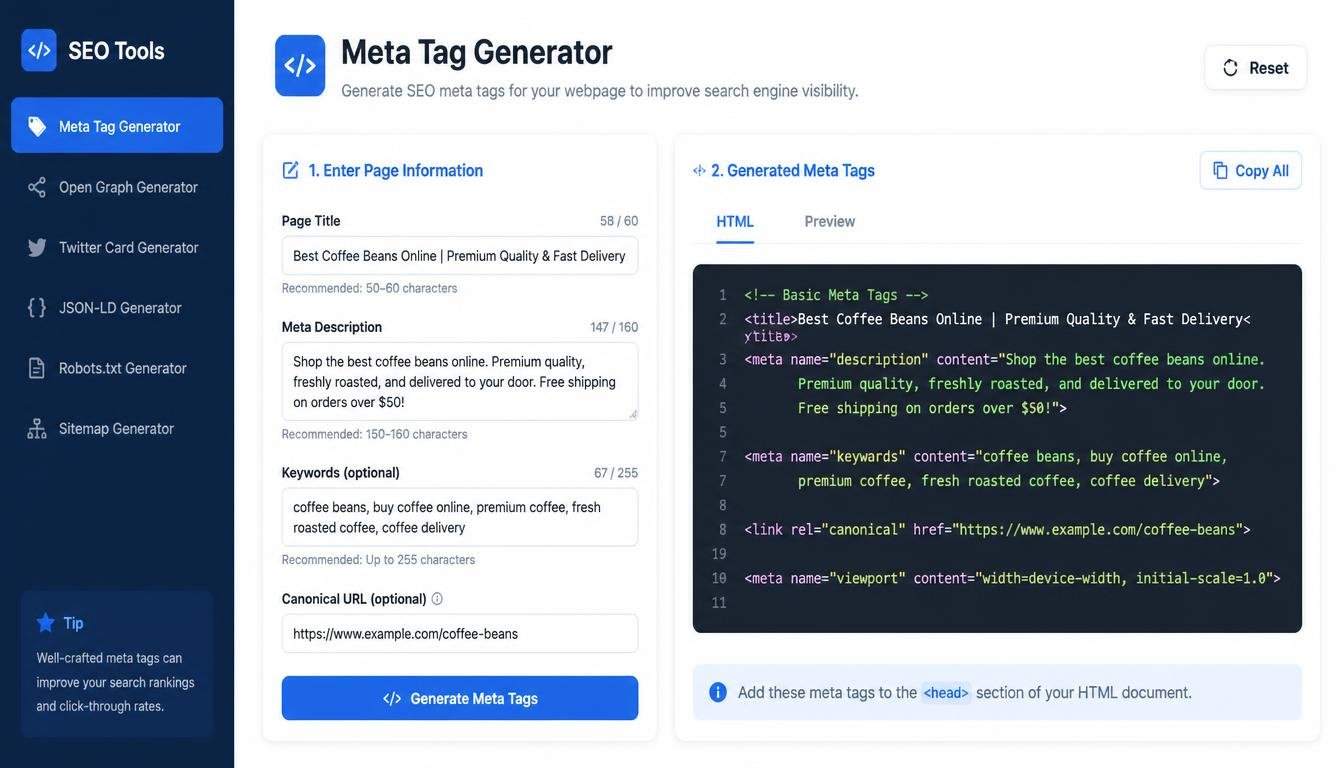
A Meta Tag Generator allows you to enter information about your webpage and generate commonly used meta tag code that you can add to your website.
For bloggers, developers, freelancers, business owners, SEO professionals, and beginners, this can make basic on-page optimization much easier.
## What Is a Meta Tag?
A meta tag is an HTML element that provides information about a webpage.
Meta tags are generally placed inside the <head> section of an HTML document.
Unlike normal webpage content, visitors usually don't see most meta tags directly on the page.
Instead, they provide information that browsers, search engines, and other systems can use.
A common example is the meta description:
<meta name="description" content="Learn how to create better content with practical writing tips.">
The description helps communicate what the page is about.
Another common tag is:
<meta name="viewport" content="width=device-width, initial-scale=1.0">
This helps control how a webpage is displayed on different screen sizes.
## What Is a Meta Tag Generator?
A Meta Tag Generator is an online tool that helps create HTML meta tags based on information you provide.
Instead of manually writing HTML code, you can enter details such as:
- Page title
- Meta description
- Author name
- Keywords, where applicable
- Robots instructions
- Viewport information
- Other supported metadata
The tool then generates code that you can copy and place into your webpage.
This can be particularly useful for people who aren't comfortable writing HTML manually.
## Why Are Meta Tags Important?
Meta tags help communicate information about your webpage.
Search engines need to understand what your pages contain, while browsers need certain technical information to display pages correctly.
However, not every meta tag has the same importance.
For example, the title element is highly important for communicating the topic of a page.
The meta description can influence how a search result is presented and can help users understand what a page offers.
Other metadata serves different technical purposes.
Understanding what each tag actually does is more useful than simply adding as many tags as possible.
## The Meta Title
One of the most important pieces of metadata associated with a webpage is its title.
Technically, the page title is created with the HTML <title> element rather than a traditional <meta> element.
For example:
<title>Best Free Writing Tools for Content Creators</title>
The title can appear in browser tabs and is commonly used by search engines when generating search-result titles.
A good page title should clearly communicate the topic of the page.
For example:
"Best Free Text Tools for Writers"
is much more useful than:
"Home Page 123"
A Meta Tag Generator may include a field for creating the title alongside other metadata.
## Meta Description
The meta description is one of the most commonly used meta tags.
A basic example looks like:
<meta name="description" content="Discover useful text tools that can help writers, students, bloggers, and content creators work more efficiently.">
The description provides a concise summary of the page.
Search engines may use it when displaying a search result, although they can choose different text depending on the search query and page content.
That's why a meta description should accurately describe the actual page.
## Does Meta Description Improve Rankings?
The meta description itself isn't generally considered a direct ranking factor.
However, it can still be valuable.
A well-written description can help searchers understand what your page is about before clicking.
If the description is relevant and useful, it may contribute to a better search-result experience.
So the goal shouldn't be to manipulate rankings with a meta description.
The goal should be to clearly communicate the value of the page.
## Meta Keywords
Older SEO practices often focused heavily on the meta keywords tag.
For example:
<meta name="keywords" content="writing tools, text tools, content writing">
However, major search engines such as Google do not use the meta keywords tag as a ranking factor.
That means adding hundreds of keywords to a meta keywords tag isn't an effective modern SEO strategy.
If your Meta Tag Generator includes a keyword field, use it only when you have a specific reason related to another system or your own workflow.
Don't rely on meta keywords to improve Google rankings.
Instead, focus on creating useful content and naturally covering the topics your audience is searching for.
## Robots Meta Tag
The robots meta tag can provide instructions to search engine crawlers about how a page should be handled.
For example:
<meta name="robots" content="index, follow">
Another possible instruction is:
<meta name="robots" content="noindex, nofollow">
These directives can have significant consequences.
For example, using noindex on a page can prevent it from appearing in search results.
Therefore, you should understand what a robots directive does before adding it to a page.
A generator can create the code, but you are still responsible for choosing the correct settings.
## Viewport Meta Tag
The viewport meta tag is important for responsive websites.
A common example is:
<meta name="viewport" content="width=device-width, initial-scale=1.0">
This tells the browser how to control the page's viewport on different devices.
Without proper viewport configuration, a website may not display as expected on mobile devices.
Since a large portion of web browsing happens on smartphones, mobile-friendly design is essential for modern websites.
## Author Meta Tag
Some websites use an author meta tag such as:
<meta name="author" content="Author Name">
This identifies the author in metadata.
However, adding an author meta tag doesn't automatically establish authorship or improve search rankings.
For content websites, visible author information and appropriate structured data can be more meaningful depending on the context.
Still, an author field can be useful for organization and documentation.
## Meta Tags for Social Media
Some metadata isn't primarily intended for traditional search results.
Social platforms can use special metadata to determine how shared pages are displayed.
One widely used system is Open Graph metadata.
For example:
<meta property="og:title" content="Best Writing Tools for Content Creators">
<meta property="og:description" content="Explore useful online tools designed to make everyday writing tasks easier.">
<meta property="og:image" content="https://example.com/image.jpg">
<meta property="og:url" content="https://example.com/article">
These tags can help define how a page appears when shared on supported platforms.
Another commonly used system is Twitter Cards metadata.
The exact supported metadata depends on the platform.
## Open Graph Meta Tags
Open Graph metadata was designed to help webpages provide structured information when shared on social platforms.
Common Open Graph properties include:
- og:title
- og:description
- og:image
- og:url
- og:type
For example:
<meta property="og:type" content="website">
These tags can improve the consistency of link previews.
If you regularly share your website's articles on social media, properly configured social metadata can make your links look more professional.
## Meta Tags and SEO
Meta tags are one part of on-page SEO, but they are not the entire strategy.
Good SEO involves much more than generating metadata.
Important areas include:
- Helpful content
- Search intent
- Page structure
- Internal linking
- Website performance
- Mobile usability
- Technical SEO
- Relevant headings
- Quality backlinks
- Clear URLs
- Good user experience
A perfect meta description cannot compensate for poor content.
Similarly, adding dozens of unnecessary tags doesn't automatically make a website search-engine friendly.
Metadata should support a strong webpage rather than replace one.
## How a Meta Tag Generator Works
A basic Meta Tag Generator usually works by collecting information through a form.
For example, you may enter:
Page Title:
Best Online Text Tools
Description:
Explore free tools for writers, students, bloggers, and content creators.
Author:
Your Brand
The tool then generates HTML code.
You might receive:
<title>Best Online Text Tools</title>
<meta name="description" content="Explore free tools for writers, students, bloggers, and content creators.">
<meta name="author" content="Your Brand">
You can then copy the generated code and add it to the appropriate location in your webpage.
## How to Use a Meta Tag Generator
Using a Meta Tag Generator is usually simple.
### Step 1: Enter Your Page Title
Write a clear title that describes the webpage.
### Step 2: Add a Meta Description
Summarize the page in a concise and useful way.
### Step 3: Add Other Information
Depending on the tool, you may enter author information, robots directives, social metadata, or other options.
### Step 4: Generate the Code
Click the Generate button.
### Step 5: Review the HTML
Check that the generated code matches the information you entered.
### Step 6: Copy the Code
Use the copy button to copy the generated tags.
### Step 7: Add Them to Your Website
Place the appropriate tags inside the <head> section of your HTML page or use the relevant SEO/CMS settings.
Always test your page after making changes.
## Meta Tag Generator for WordPress
WordPress users may not need to manually insert every meta tag.
Many WordPress SEO plugins provide fields for titles, descriptions, robots directives, and social metadata.
However, a Meta Tag Generator can still be useful for understanding what the underlying HTML looks like or for websites where you need to work directly with code.
If you're using WordPress, avoid adding the same metadata through multiple systems because duplicate or conflicting settings can create unnecessary problems.
## Meta Tag Generator for Developers
Developers often need to create metadata for dynamically generated pages.
For example, an application may create hundreds or thousands of product pages.
Each page can have its own:
- Title
- Description
- Canonical URL
- Social metadata
- Robots directives
A generator can be useful for creating sample metadata during development.
For production websites, developers generally automate metadata generation through templates and application logic rather than manually creating every page's tags.
## Meta Tags for E-Commerce Websites
Online stores can have large numbers of pages.
A product page might have:
Title:
Wireless Bluetooth Headphones
Description:
Explore wireless Bluetooth headphones with comfortable design and reliable sound for everyday listening.
Social image:
Product image
This information can be used to create appropriate metadata.
However, each product page should have unique and accurate information.
Copying the same description across hundreds of pages isn't a good way to communicate the differences between products.
## Meta Tags for Blog Posts
Every blog article should ideally have metadata that reflects its actual content.
For example:
Article:
How to Improve Blog Readability
Title:
How to Improve Blog Readability: Practical Tips
Description:
Learn practical ways to make blog posts easier to read, understand, and navigate.
This gives search engines and users useful context.
When publishing a large number of articles, a generator can make metadata creation faster.
## Common Meta Tag Mistakes
There are several mistakes website owners should avoid.
### Using the Same Description Everywhere
Each important page should ideally have a relevant description rather than using one generic description across the entire website.
### Keyword Stuffing
Adding long lists of repeated keywords doesn't create better metadata.
### Writing Misleading Descriptions
The description should accurately represent the page.
### Using Noindex Accidentally
A wrong robots directive can prevent a page from appearing in search results.
### Creating Extremely Long Titles
Titles should be clear and useful rather than unnecessarily long.
### Forgetting Social Metadata
If social sharing matters to your website, consider appropriate Open Graph metadata.
### Adding Duplicate Tags
Multiple systems can sometimes generate conflicting metadata.
Always inspect the final HTML.
## How to Write a Good Meta Description
A useful meta description should explain what visitors can expect.
Instead of:
"Welcome to our website. We have many things here."
Try:
"Learn practical content writing techniques and discover useful tools for creating clearer, more engaging online content."
The second version gives the reader a much better idea of what the page offers.
A good description should be:
- Relevant
- Clear
- Natural
- Specific
- Helpful
- Written for humans
Don't treat the description as a place to insert as many keywords as possible.
## Should Every Page Have Meta Tags?
Important pages should generally have appropriate metadata.
However, not every possible meta tag is necessary on every page.
The goal is to provide useful information and appropriate technical instructions.
Adding unnecessary metadata simply because a generator offers it isn't always beneficial.
Use the tags that actually serve a purpose for your website.
## Meta Tags and Mobile SEO
Mobile usability is a major part of modern website quality.
The viewport tag helps browsers display pages correctly across different screen sizes.
But mobile optimization involves much more than one meta tag.
Your website should also have:
- Responsive layouts
- Readable text
- Easy navigation
- Properly sized buttons
- Fast loading times
- Mobile-friendly content
A Meta Tag Generator can help with the metadata side, but it can't make a poorly designed website responsive by itself.
## Benefits of Using a Meta Tag Generator
### Saves Time
You don't have to manually write every HTML tag.
### Reduces Basic Syntax Errors
Generated code can help avoid simple formatting mistakes.
### Beginner-Friendly
You don't need extensive HTML knowledge.
### Supports SEO Workflows
It can help prepare titles and descriptions.
### Useful for Social Sharing
Some generators support Open Graph metadata.
### Helpful for Developers
It can create sample metadata quickly.
### Makes Metadata Easier to Understand
Seeing the generated code can help beginners learn how HTML metadata works.
## Who Should Use a Meta Tag Generator?
A Meta Tag Generator can be useful for:
- Bloggers
- Website owners
- SEO professionals
- Freelancers
- Developers
- Digital marketers
- E-commerce businesses
- Content creators
- Students
- Small business owners
If you manage a website but don't feel comfortable writing HTML manually, a generator can make the process much easier.
## Frequently Asked Questions
### What is a Meta Tag Generator?
It is an online tool that generates HTML metadata based on information you provide.
### Do meta tags improve SEO?
Some metadata can help search engines understand and process webpages, but meta tags alone do not guarantee higher rankings.
### Is the meta description a ranking factor?
The meta description itself is not generally treated as a direct Google ranking factor, but it can influence how a search result is presented and how users interact with it.
### Are meta keywords still important?
Google does not use the meta keywords tag as a ranking factor.
### Where should meta tags be placed?
Most meta tags belong inside the <head> section of an HTML document.
### Can I use a Meta Tag Generator for WordPress?
Yes. However, many WordPress SEO plugins already provide tools for managing titles, descriptions, robots settings, and social metadata.
### What is the viewport meta tag?
It helps browsers control the page's viewport and is important for responsive mobile layouts.
### Can meta tags control whether a page is indexed?
Certain robots directives can provide indexing instructions, but they must be used carefully.
### Should every page have a unique meta description?
For important indexable pages, unique and relevant descriptions are generally preferable to using one generic description everywhere.
### Can a Meta Tag Generator improve my website automatically?
No. The generator creates metadata code. You still need to choose appropriate information and correctly implement and review the result.
## Final Thoughts
Metadata may not be the most visible part of a website, but it plays an important supporting role.
A well-structured webpage should communicate clearly with both people and technology.
A Meta Tag Generator makes one part of that process easier.
Instead of manually remembering HTML syntax, you can enter your page information, generate the appropriate code, copy it, and add it to your website.
For beginners, this can remove much of the confusion surrounding HTML metadata.
For experienced developers and SEO professionals, it can provide a convenient way to create or check basic metadata quickly.
But it's important not to overcomplicate SEO.
You don't need dozens of unnecessary meta tags to create a successful website.
Focus on the fundamentals:
Create genuinely useful content.
Write clear page titles.
Use relevant descriptions.
Keep your URLs understandable.
Make your website fast and mobile-friendly.
Use appropriate technical directives.
Make social previews useful when social sharing matters.
And always review the final implementation.
A Meta Tag Generator is a tool that can simplify the technical side of metadata, but the quality of the information you provide is still the most important part.
Use the tool as a helper, not as a replacement for thoughtful website optimization.
When good content, clean technical structure, and useful metadata work together, your website becomes easier for people to understand and easier to manage as it grows.