# Text Reverser / Palindrome Checker: A Simple Tool for Exploring and Transforming Text
Text can be surprisingly interesting.
We normally read words and sentences from left to right, but what happens when you reverse them? Sometimes the result is funny, sometimes it looks completely different, and occasionally you discover something unexpected.
That's where a Text Reverser and Palindrome Checker can be useful.
A Text Reverser is a simple online tool that reverses the order of characters, words, or lines in a piece of text. A Palindrome Checker, on the other hand, checks whether a word, phrase, or number reads the same forward and backward according to the tool's comparison rules.
These may sound like simple text utilities, but they can be useful for students, developers, writers, programmers, puzzle lovers, teachers, and anyone who enjoys experimenting with language.
## What Is a Text Reverser?
A Text Reverser is a tool that changes the order of text.
For example:
"Hello World"
could become:
"dlroW olleH"
Every character has been placed in reverse order.
Depending on the tool, you may also be able to reverse words rather than individual characters.
For example:
"Hello World from our website"
could become:
"website our from World Hello"
These are two different types of text reversal.
Character reversal changes the order of individual letters and symbols.
Word reversal changes the order of complete words.
A good text utility can make these transformations quickly without requiring you to manually rearrange the content.
## What Is a Palindrome?
A palindrome is a word, number, or sequence that reads the same forward and backward under a defined comparison method.
Some familiar examples include:
"level"
"radar"
"civic"
"madam"
If you reverse "level", you still get "level".
That's what makes it a palindrome.
Numbers can also form palindromes.
For example:
121
reads the same from both directions.
Similarly:
1331
is also a palindrome.
Palindromes are interesting because they create symmetry in language and numbers.
## How Does a Palindrome Checker Work?
A Palindrome Checker compares text in its original direction with its reversed form.
For example, consider:
"radar"
Original:
radar
Reversed:
radar
Because the two are identical, the tool identifies it as a palindrome.
Now consider:
"hello"
Original:
hello
Reversed:
olleh
Because they are different, "hello" is not a palindrome.
Some palindrome checkers may ignore spaces, punctuation, or capitalization.
For example, a phrase containing spaces may be evaluated after removing spaces and standardizing capitalization.
Because different tools can use different rules, it's always helpful to understand how the specific checker processes text.
## Why Use a Text Reverser?
You may wonder why anyone would need to reverse text.
There are actually several reasons.
Text reversal can be useful for:
- Programming practice
- Coding exercises
- Educational activities
- Word puzzles
- Creative writing
- Text experiments
- Data transformation
- Testing applications
- Learning string manipulation
For programmers, reversing a string is a classic beginner exercise.
For students, it can demonstrate how computers process characters and sequences.
For writers and puzzle enthusiasts, it can simply be fun.
## Text Reverser for Students
Students learning computer science or programming often encounter string manipulation.
One of the simplest exercises is reversing a string.
For example:
Input:
"computer"
Output:
"retupmoc"
This simple exercise teaches students about:
- Characters
- Strings
- Index positions
- Loops
- Arrays
- Algorithms
- Data processing
Instead of writing code every time they want to experiment, students can use an online Text Reverser to see the result instantly.
This can make the concept easier to understand before implementing it in a programming language.
## Text Reverser for Programmers
String manipulation is a fundamental concept in programming.
Developers may need to reverse text while testing algorithms or demonstrating how a particular function works.
For example, a programmer might test whether:
"racecar"
remains unchanged after reversal.
This can be useful when learning how palindrome detection works.
Developers can also use text-reversal tools for quick testing of sample inputs and outputs.
Of course, in a real software project, the actual transformation would normally be performed using code rather than an online tool.
## Text Reverser for Coding Practice
If you're learning programming, you may eventually encounter exercises such as:
"Write a program that reverses a string."
A simple example is:
Input:
"hello"
Expected output:
"olleh"
Before writing your program, you can use a Text Reverser to confirm what the expected result should look like.
Then you can compare your program's output with the tool's output.
This makes online text tools useful as small testing aids during learning.
## Text Reverser for Creative Writing
Writers sometimes enjoy experimenting with unusual text formats.
Reversing words or characters can create interesting visual effects.
For example:
"Dream Big"
character reversal:
"giB maerD"
word reversal:
"Big Dream"
The result can be used for creative experiments, puzzles, games, or design concepts.
It isn't necessarily something you'll use in a normal blog post, but creative work doesn't always have to follow ordinary rules.
Sometimes experimenting with language can lead to unexpected ideas.
## Text Reverser for Puzzle Creation
Text reversal is especially useful for creating puzzles.
You could provide readers with:
"nohtyP"
and ask them to figure out the original word.
Reversing the letters creates a small challenge that can be used in:
- Educational games
- Brain teasers
- Online quizzes
- Classroom activities
- Puzzle websites
- Social media challenges
A Text Reverser makes creating these challenges quick and easy.
## Palindrome Checker for Students
Palindromes are an excellent way to introduce students to patterns in language.
A teacher might provide a list of words and ask students to identify which ones are palindromes.
For example:
Level — Palindrome
Table — Not a palindrome
Civic — Palindrome
Computer — Not a palindrome
This type of exercise can make language lessons more interactive.
It can also introduce basic ideas about symmetry, patterns, and algorithmic thinking.
## Palindrome Checker for Programmers
Palindrome detection is a common programming exercise.
A basic challenge might be:
"Write a program that determines whether a string is a palindrome."
The logic is straightforward:
1. Receive the input.
2. Normalize it if necessary.
3. Reverse the text.
4. Compare the original and reversed versions.
5. Determine whether they match.
This teaches useful programming concepts such as string handling, comparison, loops, and conditional statements.
An online Palindrome Checker can be useful for verifying expected results while practicing.
## Palindromic Numbers
Palindromes aren't limited to words.
Numbers can also read the same forward and backward.
Examples include:
11
22
101
121
1331
1221
For example:
1221
reversed becomes:
1221
Therefore, it is a numeric palindrome.
Palindrome numbers can be interesting in mathematics and programming exercises.
They can also be used to demonstrate how computers compare sequences.
## Palindrome Phrases
Some longer phrases can also form palindromes when spaces, punctuation, and capitalization are ignored.
A commonly known example is:
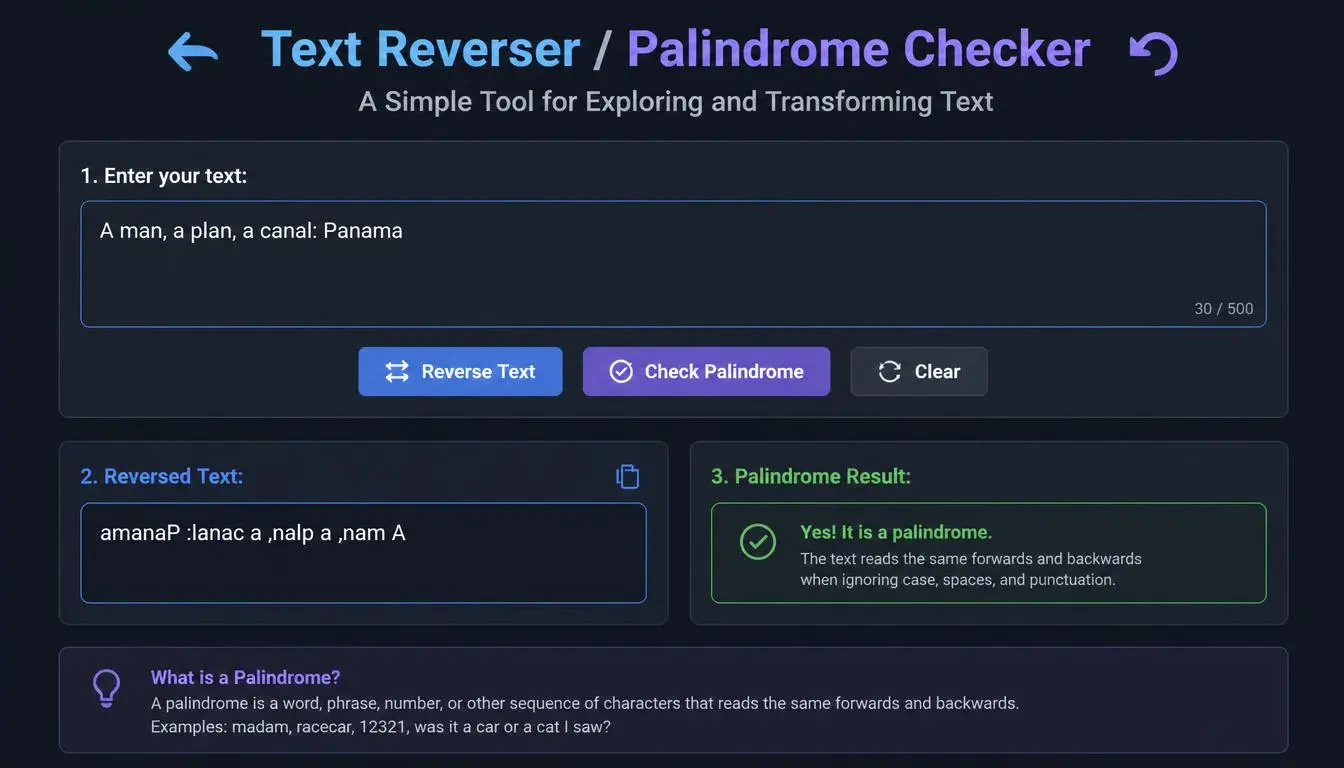
"A man, a plan, a canal: Panama"
When evaluated using normalized characters, the phrase has the same sequence forward and backward.
This demonstrates why a Palindrome Checker may need to normalize text before making a comparison.
For example, a tool might remove:
- Spaces
- Punctuation
- Capitalization differences
before checking the sequence.
The exact behavior depends on the tool.
## Why Text Normalization Matters
Consider these two strings:
"Level"
"level"
Technically, they differ in capitalization.
But for many palindrome checks, capitalization isn't important.
If a checker converts everything to lowercase first, both become:
"level"
Then the comparison becomes easier.
Similarly, a phrase such as:
"Never odd or even"
contains spaces that may be ignored during palindrome detection.
This is why different tools may produce different results depending on their settings.
## Character Reversal vs. Word Reversal
One important distinction is the type of reversal being performed.
Consider:
"AI makes writing easier"
### Character Reversal
"reisae gnitirw sekam IA"
### Word Reversal
"easier writing makes AI"
Both results are reversed, but in different ways.
Character reversal changes every character's position.
Word reversal changes the position of complete words.
When using a Text Reverser, make sure you choose the type of transformation you actually need.
## Text Reverser for Developers Testing Data
Developers sometimes need quick transformations when testing an application.
Suppose you're building a program that processes user input.
You might want to test what happens when a string is reversed.
Instead of creating test data manually, you can generate sample reversed text quickly.
This can be particularly convenient during small experiments or debugging sessions.
For production systems, however, test data should be generated and managed using appropriate development workflows.
## Text Reverser for Content Creators
Content creators can use text reversal for creative purposes.
For example, you could create:
- Puzzle posts
- Interactive quizzes
- Social media challenges
- Hidden messages
- Educational games
- Brain teasers
A reversed word can encourage people to stop scrolling and figure out what it says.
That simple interaction can make a piece of content more engaging.
## Text Reverser for Teachers
Teachers can use text-reversal activities to make lessons more interactive.
For example, an English teacher could provide several reversed words and ask students to decode them.
A computer science teacher could use string reversal to introduce programming concepts.
A mathematics teacher could discuss palindromic numbers.
The same basic idea can therefore be used across different subjects.
## How to Use a Text Reverser
Using a Text Reverser is usually very easy.
### Step 1: Enter Your Text
Type or paste the text you want to reverse.
### Step 2: Choose the Reversal Type
If available, select character reversal, word reversal, or line reversal.
### Step 3: Run the Tool
The tool processes your text and generates the reversed version.
### Step 4: Review the Result
Check whether the transformation is what you expected.
### Step 5: Copy the Result
You can then use the transformed text for your project, experiment, puzzle, or testing.
## How to Use a Palindrome Checker
Checking a palindrome is just as simple.
### Step 1: Enter a Word or Phrase
Type or paste your text.
### Step 2: Run the Check
The tool compares the text with its reversed version.
### Step 3: View the Result
The tool tells you whether the input qualifies as a palindrome according to its checking rules.
### Step 4: Experiment With Other Examples
Try different words, phrases, and numbers to see how the results change.
## Benefits of Using a Text Reverser / Palindrome Checker
These tools are simple, but they can still be useful.
### Saves Time
You don't need to manually reverse long text.
### Helps With Learning
Students can experiment with strings and patterns.
### Useful for Programming
Developers can test examples while learning string manipulation.
### Supports Creative Projects
Writers and creators can create puzzles and interactive content.
### Makes Language More Interesting
Palindromes reveal fascinating patterns in words and phrases.
### Easy to Use
No programming knowledge is required for basic text transformations.
## Who Can Use These Tools?
A Text Reverser or Palindrome Checker can be useful for:
- Students
- Teachers
- Programmers
- Developers
- Writers
- Bloggers
- Content creators
- Puzzle enthusiasts
- Researchers
- Parents creating educational activities
You don't need to be a programmer to enjoy experimenting with reversed text.
## Things to Keep in Mind
A text transformation tool performs a mechanical operation.
It doesn't necessarily understand the meaning of your text.
For example, reversing a sentence doesn't produce a meaningful sentence in the normal sense.
Likewise, a palindrome checker doesn't determine whether a phrase is grammatically correct or meaningful.
It simply checks whether the character sequence meets the conditions used by the tool.
That's why these tools are best viewed as utilities for transformation, testing, learning, and experimentation.
## Frequently Asked Questions
### What is a Text Reverser?
A Text Reverser is a tool that changes the order of characters, words, or lines in a piece of text.
### What is a palindrome?
A palindrome is a word, phrase, or sequence that reads the same forward and backward according to the comparison rules being used.
### Is "level" a palindrome?
Yes. "level" reads the same in both directions.
### Is "hello" a palindrome?
No. Reversing "hello" produces "olleh."
### Can numbers be palindromes?
Yes. Numbers such as 121 and 1331 are examples of palindromic numbers.
### Can a Text Reverser reverse an entire sentence?
Yes. Depending on the tool, it may reverse individual characters, words, or lines.
### Is a Text Reverser useful for programming?
Yes. It can be useful for learning string manipulation and checking expected results during coding practice.
## Final Thoughts
Text doesn't always have to be used in the ordinary way.
Sometimes reversing a word reveals an interesting pattern. Sometimes a simple number turns out to be a palindrome. Sometimes a text transformation becomes the starting point for a programming exercise or an entertaining puzzle.
A Text Reverser and Palindrome Checker make these experiments quick and accessible.
Students can use them to learn.
Programmers can use them to test ideas.
Teachers can use them to create classroom activities.
Content creators can use them to make interactive puzzles.
And curious users can simply have fun exploring how language behaves when its order changes.
The tools are simple, but that's part of their appeal.
You enter your text, choose what you want to do, and get the result almost instantly.
Whether you're checking "radar," experimenting with a reversed sentence, testing a programming exercise, or creating a brain teaser for your audience, a Text Reverser / Palindrome Checker can turn an ordinary piece of text into something worth exploring.
Sometimes the simplest tools are the ones that make us look at familiar things in a completely different direction.